






LED Stage Light Bars: Types, DMX Setup & Safety Guide
- Quick Answer: How to Choose and Set Up LED Stage Light Bars
- Key Takeaways
- Which Type of Stage Bar Do You Need?
- Plan Optics and Mounting from the Actual Stage
- How to Design DMX and Pixel Mapping
- Power Distribution: Calculate Instead of Guessing
- Outdoor Suitability and Camera Performance
- Buyer Checklist and Stage Bar Content Map
- Request a Fixture-Level Setup Review
- Frequently Asked Questions
- What is the difference between a linear wash bar and a pixel bar?
- How many DMX channels does a stage light bar need?
- What determines the maximum number of power-linked bars?
- How do I prevent banding or flicker on camera?
- How far should an LED bar be mounted from a wall?
- Can LED light bars be used outdoors?
- Can different brands be controlled together?
- What matters for overhead rigging?
Quick Answer: How to Choose and Set Up LED Stage Light Bars
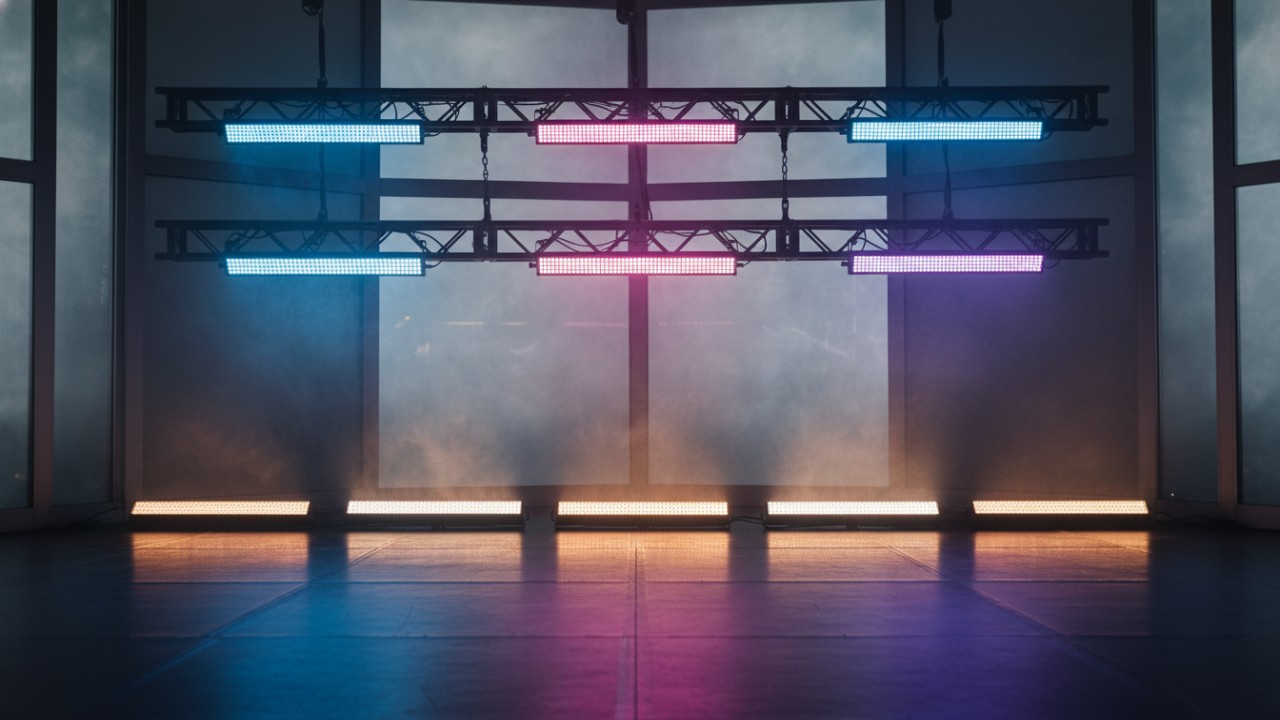
LED stage light bars are linear fixtures used for scenic washing, backdrop illumination or individually addressable visual effects. The correct bar depends on the application: a uniform linear wash, a pixel-mapped effect, a moving pixel zoom bar or a portable battery-powered unit can require different optics, control and mounting. Select the model first, then build the DMX, electrical and installation plan from its manual rather than generic rules of thumb.
Key Takeaways
- Separate wide-area wash requirements from pixel-mapping and moving-head effects.
- Obtain the exact fixture's photometric data, channel chart, power-link limits, mounting instructions and environmental rating.
- Do not assume a universal power-link count, wall distance, beam angle or camera-safe refresh-rate threshold.
- Use dedicated support guides for venue applications and pixel control, then link to verified product and model pages.
Which Type of Stage Bar Do You Need?
| Fixture type | Primary job | Questions to ask before purchase |
|---|---|---|
| Linear wash or cyclorama bar | Blend color across a stage, wall or scenic surface | Beam distribution, color quality, dimming, fixture spacing and throw |
| Pixel LED bar | Run chases, gradients and zoned effects | Number of independent zones, DMX modes, universe demand and mapping orientation |
| Moving pixel zoom bar | Combine motorized movement with pixel or zoom effects | Motorized axes, optics, zoom, per-pixel control, mass and rigging clearance |
| Battery or wireless bar | Temporary deployment where cable runs are constrained | Rated runtime at desired output, charging, wireless protocol and battery transport rules |
UPLUS's PIX-B series model comparison is a separate product-family support page. This general guide remains the broad installation and selection Hub rather than a catalogue of one product family.
Plan Optics and Mounting from the Actual Stage
Start with a plan showing stage dimensions, scenic surfaces, audience sightlines and available hanging positions. State whether the priority is smooth coverage or a deliberately visible array of pixels. Select beam shape, fixture spacing and mounting distance based on model photometrics and a mock-up; a fixed wall-grazing distance does not work across all lenses and textures.
For floor-mounted bars, secure the manufacturer-approved support or mounting hardware and manage glare and cable routing. For overhead rigs, check the mounting points, rated clamps, structural loads and secondary retention specified by the manufacturer and applicable venue rules. Do not treat a universal rigging statement as a substitute for local standards and a qualified rigging plan.
How to Design DMX and Pixel Mapping
DMX512 defines a control transport; pixel behavior comes from the fixture's channel mapping and the controller's configuration. Before patching, read the product's DMX mode table and determine whether the fixture exposes one color group, several zones or individual pixels. Keep an addressing plan, track universe capacity and label physical fixture orientation so chases travel in the intended direction.
- List each chosen model and its available control modes.
- Select a mode that supplies the control granularity required by the show.
- Calculate total DMX channels and required universes using the manual, not a universal 3-channel or 48-channel assumption.
- Document controller, signal topology, addressing, line lengths and suitable termination.
- Run a color order, dimming, strobe and chase test on the actual fixtures before load-in.
For deeper programming and model selection, see the DMX LED pixel bar selection guide. The Stage Bar venue application guide covers theater, worship and DJ considerations and should remain a narrower Support page.
Power Distribution: Calculate Instead of Guessing
Do not specify “8–10 at 120V” or “10–20 bars per outlet” as a general rule. A safe design uses the selected fixture's maximum rated electrical input, supply voltage, power-factor considerations where relevant, inrush characteristics and the manufacturer’s maximum power-link or through-current rating. Confirm cable and connector specifications and the venue's electrical protection requirements.
| Input | Where to obtain it | How it is used |
|---|---|---|
| Maximum electrical input and inrush | Product manual and electrical documentation | Circuit capacity and startup planning |
| Power-link rating | Manufacturer's explicit through-current or link-limit specification | Maximum permitted linked fixtures |
| Supply voltage and frequency | Venue and product documentation | Compatibility and circuit planning |
| Cable, connector and breaker ratings | Applicable equipment and local electrical requirements | Safe installation limits |
A qualified electrician or venue technical team should verify the power plan. Keep control-signal distribution separate from the electrical load calculation.
Outdoor Suitability and Camera Performance
For outdoor deployment, check the model's documented IP rating, connector protection, installation position and operating conditions. Do not assume that every LED bar is waterproof, or that an IP label eliminates all environmental constraints.
For camera-facing work, test the fixture with actual frame rates, shutter speeds and dimming levels. PWM refresh frequency alone cannot prove that a specific camera and light combination is flicker-free. Request manufacturer test information where available and confirm performance on-site.
Buyer Checklist and Stage Bar Content Map
- Define the effect: general wash, pixel chase, moving zoom or battery deployment.
- Request beam distribution, zoom, color-system and dimming data for the selected model.
- Check DMX personalities, mapping and supported wired/wireless protocols.
- Verify mountings, rated weight, power linking and ingress protection.
- Check service access, spare-part availability and control documentation.
This guide is the general selection and setup Hub. For commercial comparisons, use Stage Bar product comparisons; for pixel control use the dedicated DMX Support; for PIX-B family differences use the series comparison page; then review the PIX-B560 product page and the other specific product pages.
Request a Fixture-Level Setup Review
Share your venue plan, fixture candidates, desired DMX effect, target mounting points, supply details and indoor/outdoor constraints when you contact UPLUS Lighting. The appropriate number of bars and channel settings can then be evaluated against exact model manuals and the project brief.
Frequently Asked Questions
What is the difference between a linear wash bar and a pixel bar?
A wash bar is primarily specified for a continuous area of light, while a pixel bar allows individual LEDs or zones to be controlled for gradients and chases. The exact control granularity depends on the model and its selected DMX mode.
How many DMX channels does a stage light bar need?
There is no universal channel count. The number depends on the manufacturer’s DMX personality, dimmer, color system and number of controllable pixel zones. Use the current fixture manual to calculate the number of universes.
What determines the maximum number of power-linked bars?
Use each fixture’s specified through-current or power-link limit, local supply voltage, cable and connector ratings, protective devices and the overall circuit design. Do not use a fixed 8–10 or 10–20 fixture rule.
How do I prevent banding or flicker on camera?
Test the exact fixture's dimming and PWM or driver behavior with the intended camera frame rate, shutter settings and exposure. A single advertised refresh-rate threshold does not guarantee flicker-free video.
How far should an LED bar be mounted from a wall?
Distance depends on lens distribution, wall texture, intended effect and brightness uniformity. Begin with a mock-up or photometric plan; do not assume one 6–12 inch wall-grazing distance works for every fixture.
Can LED light bars be used outdoors?
Only where the particular product’s protection rating, installation method, connectors and operating conditions support the use. Check manufacturer instructions and the event site requirements.
Can different brands be controlled together?
Often yes through a properly designed DMX or network-control system, but check personality maps, channel counts, termination, addressing and fixture behavior. Automatic master/slave effects may not be interoperable.
What matters for overhead rigging?
Check mounting hardware, fixture weight, rated attachment points, secondary retention where required, load-bearing structure and applicable local standards. Follow the exact manufacturer instructions.
Top 10 Mini Beam Moving Head Lights in 2026: The Ultimate Buyer's Guide [Updated]
Top 10 stage and theatre lighting Manufacturers and Supplier Brands in China
Energy Efficiency of Mini LED Spot Moving Head Lights Explained
How to Choose a Moving Head Strobe for Venue Size

1000W Waterproof BSWF 4-in-1 Moving Head combines beam, spot, wash, and frame effects in one. IP-rated waterproof design, high-brightness output, precise control, ideal for outdoor & indoor stage events.
If you have any comments or good suggestions, please leave us a message, later our professional staff will contact you as soon as possible.
Lighting Innovators
Uplus Lighting is a leading integrated company specializing in R&D, design, production, and sales of stage lighting solutions.
 Scan QR Code
Facebook
Instagram
YouTube
VK